

Getting your Roblox asset workflow right is the difference between a trickle of Robux and a real income stream. Most developers list a few assets, see slow results, and assume the marketplace is too competitive. But the real issue is almost always process: skipping requirements, uploading weak thumbnails, or pricing without strategy. This guide walks you through every step, from eligibility to optimization, so you can list assets faster, rank higher, and actually earn. Whether you sell Roblox scripts, Roblox models, or Roblox UI kits, the fundamentals are the same.
Table of Contents
- Understand the requirements for selling on the Roblox marketplace
- Prepare your assets for marketplace success
- Navigate the publishing process efficiently
- Optimize workflow for visibility and earnings
- Why experience beats the official instructions in the marketplace
- Take your Roblox asset workflow even further
- Frequently asked questions
Key Takeaways
| Point | Details |
|---|---|
| Meet selling requirements | Check account status, Roblox Premium, and verification before starting. |
| Optimize asset presentation | Use clear titles, quality images, and thorough documentation to increase sales. |
| Know marketplace fees | Factor in Roblox’s 30% commission or Stripe fees for USD payouts. |
| Leverage pricing strategies | Test and adjust pricing, offer bundles, and focus on high-demand asset types. |
| Continuous improvement | Analyze what sells, collect feedback, and keep upgrading your asset portfolio. |
Understand the requirements for selling on the Roblox marketplace
Before you invest hours building and polishing assets, make sure you actually qualify to sell them. Skipping this step is one of the most common and frustrating mistakes new creators make. The Creator requirements are clear: your account or group must meet platform standards, Roblox Premium is mandatory for selling, ID verification applies to certain asset types like UGC items, and a clean moderation history is non-negotiable.
Here is a quick breakdown of what you need before listing:
- Roblox Premium membership (required to sell any paid asset)
- Two-factor authentication (2FA) enabled on your account
- Good moderation history with no active bans or serious violations
- ID verification for UGC (user-generated content) items
- UGC program acceptance if you want to sell avatar accessories or clothing
- Tax information on file if you plan to use DevEx (Developer Exchange) to convert Robux to real money
Not every asset type has the same barrier to entry. Here is a comparison to help you plan:
| Asset type | Premium required | ID verification | UGC application | DevEx/tax info |
|---|---|---|---|---|
| Scripts | Yes | No | No | If using DevEx |
| Models/3D assets | Yes | No | No | If using DevEx |
| Classic clothing | Yes | No | No | If using DevEx |
| UGC avatar items | Yes | Yes | Yes | Yes |
| Plugins | Yes | No | No | If using DevEx |
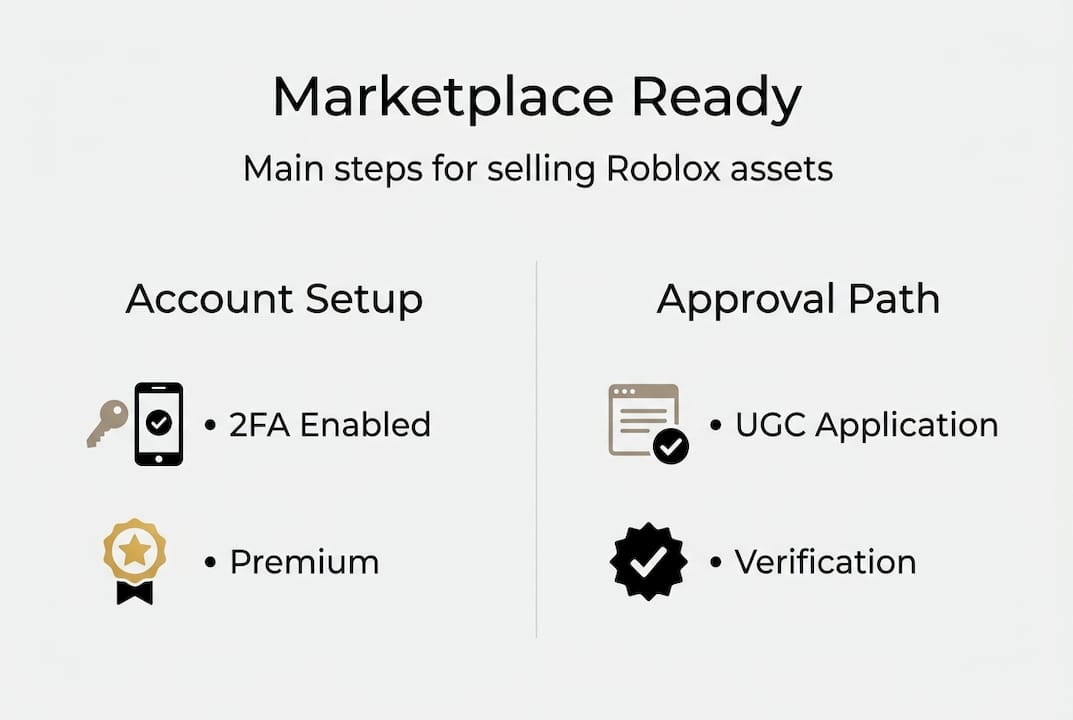
The UGC path is the most involved. Roblox reviews applications manually, and acceptance is not guaranteed. If you are just starting out, focus on scripts, models, and plugins first. These categories have lower barriers and still offer solid earning potential.
Pro Tip: Set up 2FA and verify your tax details even before you have assets ready to sell. These steps take time, and you do not want them blocking your first upload when you are ready to go live.
One thing that catches developers off guard is the moderation history requirement. Even older, minor violations can create friction. Review your account standing in the Creator Dashboard before you start building your catalog.
Prepare your assets for marketplace success
Once you know you're eligible, it's time to get your assets into top shape for listing. The marketplace is crowded. Quality and presentation are what separate assets that sell from ones that sit unnoticed for months.
Follow these steps to prepare every asset professionally:
- Test thoroughly. Every script, model, or UI kit must be bug-free before upload. Test in multiple game environments, not just your own.
- Write clear documentation. Include setup instructions, dependencies, and known limitations. Buyers trust sellers who communicate well.
- Create strong visuals. Your icon and screenshots are the first thing buyers see. Use clean, well-lit renders and real in-game screenshots.
- Record a short demo video. Even a 30-second clip showing your asset in action dramatically increases buyer confidence.
- Write a keyword-rich title and description. Think about what a developer would type when searching for your asset. Use those exact words.
"Price dynamically with a floor, use descriptive titles and tags for SEO, bundle assets, A/B test pricing, and focus on developer pain points for plugins and models." This approach, drawn from sell Roblox items best practices, consistently outperforms generic listing strategies.
Bundling is underused and highly effective. Instead of listing five separate UI elements, package them as a complete kit. Buyers get more value, and you earn more per transaction. Browse new Roblox assets to see how top sellers structure their bundles for maximum appeal.
For visual inspiration, look at something like the vector icon pack as a reference for clean presentation and clear value communication.

Pro Tip: A/B test your asset titles by updating them every two weeks. Track which version generates more clicks and sales through your Creator Dashboard analytics. Small wording changes can shift discoverability significantly.
SEO matters more than most developers realize. Roblox search works similarly to any product marketplace. Descriptive, specific titles outperform vague ones every time. "Sci-fi door animation script with open/close toggle" will always outrank "cool door script."
Navigate the publishing process efficiently
Your assets are ready. Now let's get them onto the marketplace in the smartest and most profitable way.
Here is the step-by-step publishing flow:
- Open Roblox Studio and locate your asset in the Explorer or Toolbox.
- Right-click and select "Publish to Roblox" or use the Asset Manager.
- Fill out the title, description, category, and tags carefully.
- Set your price in Robux or, if eligible, opt for USD pricing.
- Submit for moderation review. Most assets are reviewed within 24 to 48 hours.
Understanding the fee details is critical before you set prices. Here is the current structure:
| Sale type | Upload fee | Commission | Creator keeps |
|---|---|---|---|
| Classic clothing | 10 Robux | 30% | 70% in Robux |
| 3D models (Robux) | Varies | 30% | 70% in Robux |
| 3D models (USD, US only) | None | Stripe fees only | ~100% net |
| Plugins | Varies | 30% | 70% in Robux |
The USD payout option for models is a significant development introduced in December 2025 for U.S.-based sellers. Payments process through Stripe, and creators keep nearly the full sale price after standard payment processing fees. This makes model sales far more attractive for U.S. developers compared to the Robux-to-DevEx conversion path.
For Robux sales, the marketplace commission sits at 30%, meaning you keep 70%. To offset this, volume and bundling are your best tools. Selling five assets at 50 Robux each earns less than one bundle at 300 Robux, even after commission.
Check the marketplace status page before submitting batches of assets, especially during high-traffic periods. Moderation queues can slow down during platform events. Planning your launches around quieter windows can speed up your go-live timeline.
For game-specific templates, look at structured examples like asset templates to understand how experienced sellers format their submissions for fast approval.
Optimize workflow for visibility and earnings
Now that your assets are live, it's time to boost their reach and your payout.
Visibility on the Roblox marketplace is not random. These factors directly influence how your assets rank and get discovered:
- Tags and categories: Use all available tag slots. Be specific. "Tycoon," "simulator," and "UI" are stronger than generic terms.
- Update frequency: Regularly updating assets signals activity to the platform and can improve ranking.
- Rating and review count: Assets with 4.5 stars or higher consistently outperform lower-rated ones in search results.
- Sales velocity: Early sales matter. A strong launch week can establish momentum that compounds over time.
- Portfolio size: Sellers with 10 to 20 quality assets build credibility and cross-sell naturally.
According to earnings benchmarks, plugins have the highest earning potential of any asset category, while 3D models are the most beginner-friendly entry point. Roblox paid $800M+ to creators in 2024, which means real money is flowing through the platform. The question is whether your workflow positions you to capture a share of it.
Dynamic pricing is worth testing. Start slightly above your target price, then lower it after gathering initial data. Some assets perform better at a premium price point because buyers associate higher cost with higher quality.
Pro Tip: Target underserved niches. Most developers flood popular categories like obby assets or generic UI buttons. Specialized tools, like a Pet Sim Tuner or a polished pixel art set like Seriums Pixel Pack Lite, face far less competition and attract dedicated buyers willing to pay more.
Building reviews early is a game changer. Reach out to buyers through your game's community or Discord. Ask for honest feedback. Even a handful of early reviews can push your asset above competitors with zero ratings.
Why experience beats the official instructions in the marketplace
Official Roblox documentation is accurate. It is also incomplete in ways that matter. It tells you what the rules are, but not what actually works once you are competing against thousands of other creators.
The reality is that high competition requires patience and iteration, not just policy compliance. Most tutorials focus on setup and Premium enrollment. What they skip is the grind: the first 30 assets that barely sell, the pricing experiments that fail, and the slow accumulation of reviews that eventually tips the algorithm in your favor.
Top sellers do not chase every new trend. They pick a niche, go deep, and listen obsessively to buyer feedback. A developer who specializes in simulator economy scripts will always outperform a generalist who makes one of everything. Depth builds trust, and trust builds sales.
The uncomfortable truth is that the marketplace rewards consistency more than creativity alone. Showing up with quality assets every month, updating older listings, and responding to buyer questions compounds over time in ways that a single viral asset rarely does.
Take your Roblox asset workflow even further
Ready to skip the learning curve and access top-tier assets instantly?
At RoMarkets, we have built a curated Roblox asset marketplace specifically for developers who want to move fast without sacrificing quality. Whether you need polished Roblox models to fill out a game world or detailed Roblox maps to anchor your next project, our catalog is stocked with assets vetted for real development use. Every resource is designed to slot directly into your workflow, so you spend less time building from scratch and more time shipping games that players love.
Frequently asked questions
What are the main requirements to sell on the Roblox asset marketplace?
You need Roblox Premium, 2FA enabled, a good moderation history, plus account or group verification for certain asset types like UGC items.
How much does Roblox take from asset sales?
Roblox takes a 30% commission from Robux sales, so creators keep 70%. For USD model payouts available to U.S. sellers, only standard Stripe processing fees apply.
What types of assets make the most money?
Plugins earn the most overall, while 3D models are the easiest starting point. Building a portfolio of 10 to 20 assets with strong ratings accelerates earnings significantly.
What are some mistakes to avoid when listing assets?
Vague titles, weak screenshots, missing documentation, and ignoring SEO best practices all hurt discoverability and reduce your chances of making consistent sales.
Can I get paid in real money for my asset sales?
Yes. U.S. sellers can receive USD payouts via Stripe for model sales as of December 2025. Other sales pay out in Robux, which eligible creators can convert through DevEx.